Apothecary Chat
Customizable Chat Overlay for Blue Protocol: Star Resonance
What is this?
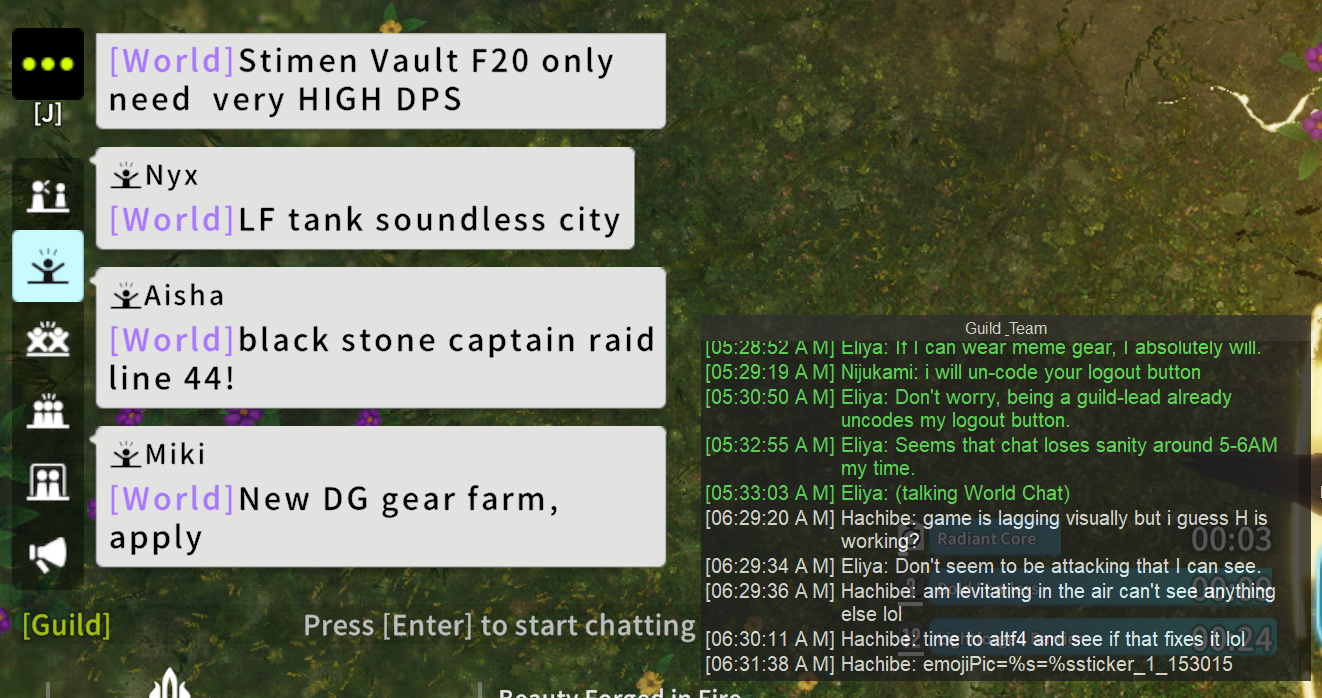
A chat overlay widget that lets you create customizable chat panes to overlay on top of your game window. See party, guild, private messages, and more in separate, filterable windows with alert notifications.
Features
- Multiple Chat Windows: Create unlimited customizable chat panes for different message types.
- Alert Notifications: Unique chimes for different message types (party, guild, DM, etc.).
- Private Messages: See DMs without opening friends list, even from non-friended players.
- Auto-Translation: Translate chat messages on your PC, no online service needed.
- Chat Filters: Filter messages by text content, player, or regex patterns.
- Click-Through Mode: Position windows, then enable click-through to avoid interference.
- Custom Themes: Adjustable colors, opacity, and styling per window.
- Multi-Interface: Monitor multiple network interfaces simultaneously.
- Multi-Service: Separate databases for different game regions (Global, SEA, CN).
Requirements
- WinPcap or Npcap must be installed (already present if you use a DPS Meter).
- For non-admin usage, configure pcap for standard user capture.
Quickstart Guide
First-Time Setup
Download, extract, and run apothecary_chat.exe. On first launch, select your game's network interface.
Tip: Hold left SHIFT on startup to re-select the network interface.
System Tray
- Red = Disconnected
- Green = Connected to game
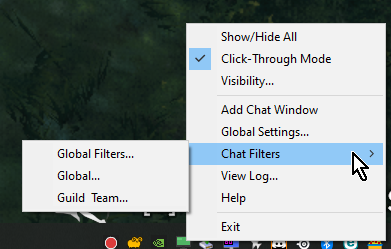
- Right-click tray icon for menu options.
Creating Chat Windows
- Right-click tray icon and add a new window.
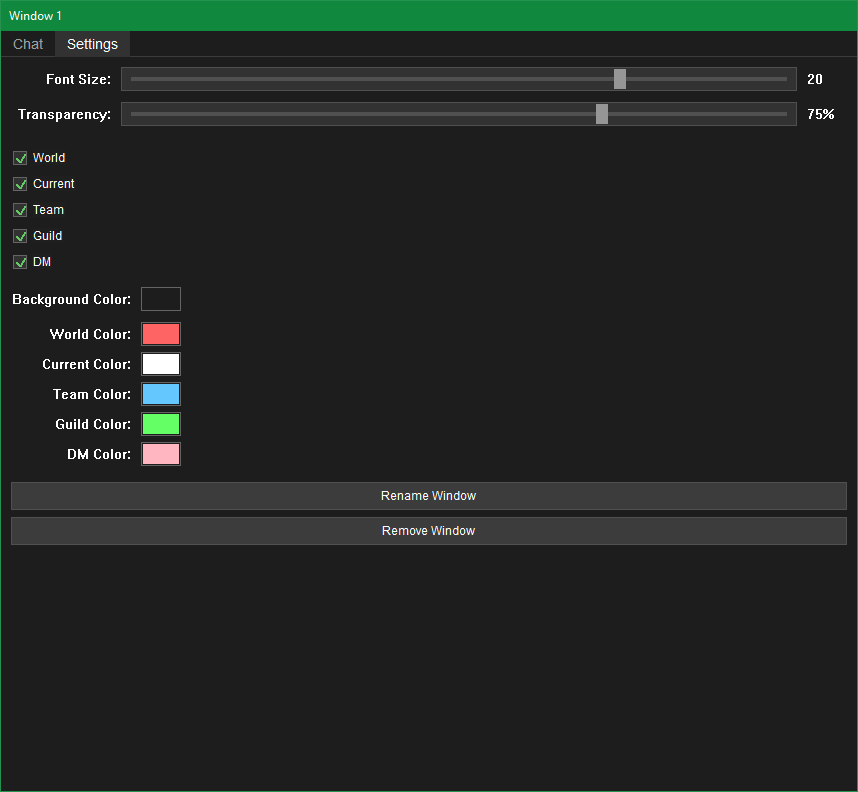
- Configure which message types to display (Party, Guild, World, DM, etc.).
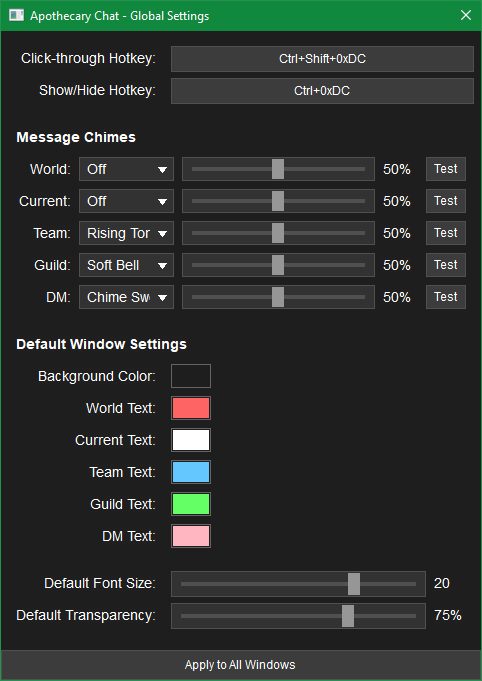
- Set alert sounds for different message types in Global Settings.
- Customize colors and appearance in the Settings tab (visible for chat windows when not in click-through mode).
Using Filters
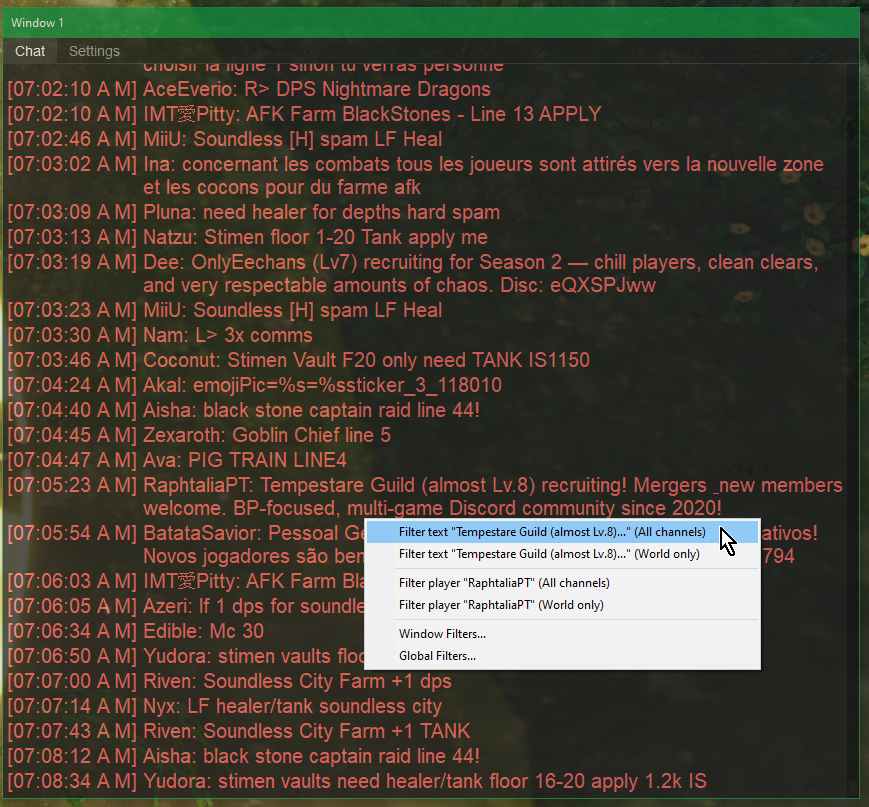
- Right-click any message to quickly add a filter.
- Filter by text content, player UID, or regex patterns.
- Apply filters globally or per-window.
Changelog
Settings
- Automatically remove db backups older than a week.
Maintenance Release
- Optimizations (reduced memory use) and polish / minor bugfixes.
Translation
- Skip common gamer terms like GG, TY, and AFK.
- Hide translations that repeat the original message in that they just modify spacing, punctuation, etc.
- Reduce nonsense translations of short messages.
Audio
- Enhance the chime engine.
Translation Display
- Dim original messages after a translation attempt.
- Choose the color and opacity per window. Defaults to 15% black.
Settings
- Added check and uncheck all buttons to Apply-to-All.
Major Feature Release -- Translation
- Added "optional" LOCAL auto-translation for chat messages.
- Translation is disabled by default and no model files are downloaded automatically.
- To enable auto-translation, open Global Settings -> Local Translation, choose a CPU or GPU translation model and language detector -- or use the defaults --, select the source and target languages, click Download, then check Enable Translation.
- Available models range from approximately 500 MB to 4 GB.
- Translations appear beneath the original message.
- Right-click option for manual translation.
- Per-window translation display and coloring.
- Choose retroactive translation or new-messages-only.
- Clipboard Text-Translator for replying to folks.
- All translation runs locally on your PC. No ONLINE Services involved. This is fully local~
Memory Optimizations
- Reduced glyph and image cache memory usage by 25%, and text-layout cache memory usage by 37%.
- Text engine performance is 1.4–3% slower in exchange for the lower memory usage.
Hotfix
- Improved TCP state handling and game-detection logic.
Hotfix
- Eliminate erase flicker on first paint of combobox and menu popups, and flicker on editbox changes.
Rendering & Portability
- Expanded the unified 2D raster renderer to text, widgets, and geometry throughout the rest of the program outside Chat Windows.
- Removed the GDI+ dependency; GDI is now used only to present completed frames.
- Bounded glyph-atlas memory with an LRU cache and reduced backbuffer reallocations.
- Continued laying the foundation for reducing Windows-specific dependencies and enabling future Linux portability.
Optimizations
- Full rewrite of the Chat Window renderer.
- Hybrid GDI / hand-optimized CPU-Driven 2D text-raster.
- Multithreading, glyph caching, buffer and geometry precomputation, and other various shortcuts....
Optimizations
- Chat in layered drawing mode ~20% faster.
Conversation Logs
- Added optional conversation logging in General Settings. It is off by default and, when enabled, saves every received chat message, including messages hidden by chat-window filters.
- Logs are organized by date and chat type and include player names and in-game IDs. Private-message logs show both the sender and recipient.
- Use the default log folder or choose a custom location.
Chat Windows
- Added options to hide timestamps or shorten AM/PM to A/P.
Settings
- Added visual groups/categories to settings.
Optimizations
- Text rendering is 7% faster.
Compatibility
- Switched to dynamic linkage to work-around false-positives.
Optimizations
- Chat Window rendering is now 3x faster.
Menus
- Fixed Chat Windows appearing over open menus, such as right-click dropdowns.
Rendering
- Rendering improvements for non-layered rendering.
Rendering
- Improved smooth scrolling "smoothness".
- Reworked animation timing and rendering and added fallbacks.
- Optimized Chat Windows. (performance)
Scrolling
- Improved Global Settings scrolling performance.
- Chat Window scrollbars now update immediately while smooth scrolling.
Chat Windows
- Fixed layered text appearing without its background or border.
Chat Windows
- Optimized resize responsiveness.
- Fixed layered overlays ping-pong resizing when moving Chat Windows between displays of different DPI.
Chat Windows
- Fix various bugs and regressions.
Text Rendering
- Major rewrite of text rendering engine, with multi-font glyph support and tiered fallbacks.
- Bundle FiraSans and NotoSans.
Background Images
- Added per-window background images with adjustable placement, scale, transparency, and stretch-to-fill support.
- Preview shows the selected window's dimensions, title area, rounded edges, border appearance, background color, and image placement.
- Open the editor from a chat window's settings or the new Background system tray menu.
Smooth Scrolling
- Optional smooth scrolling for individual chat windows. Smooth scrolling follows mouse-wheel, scrollbar, docked auto-scroll, and click-through scrolling.
- Global default with "Apply to All Windows" support and per-chat-window settings.
- Customizable animation FPS target.
- Scrolling speed remains consistent regardless of the selected animation framerate.
Window Appearance
- Optional rounded edges for individual chat windows.
- Window border color, width, and transparency settings. Layered rendering supports independent border transparency.
- Global defaults with "Apply to All Windows" support for all new appearance options.
- Fixed chat-window title font sizes being inconsistent between layered and non-layered rendering.
Global Settings
- "Apply to All Windows" can now be scrolled if the dialog does not fit the screen.
Rendering
- Fixed pure-black text appearing incorrectly in layered drawing mode.
- Prevented emoji and other Unicode characters from splitting at line wraps.
- Improved handling when Windows graphics resources are unavailable.
Networking
- Better recovery from malformed and unrecognized network frames.
- Better capture startup, restart, interface failure handling, and shutdown handling.
Reliability
- Numerous small bug fixes and improvements, especially to database handling and upgrades.
- Corrupt imports now abort and preserve the settings they were intended to replace.
Stability
- Fixed a race condition during shutdown with the logger, that can cause a crash.
Chat
- Fix Master-Seal card link decoding when no data.
Chat
- Add decoding of Master-Seal card links.
Names
- Chat panes now show UID when player name contains no visible characters.
Improvements
- Added Season III support.
- Added the Newbie channel for chat window displays, chimes, filters, and other channel rules.
- Newbie messages are off by default in each chat pane; enable the Newbie channel in each pane where you want to see them.
Batch Clipboard
- Manage Batches editor accessible via System Tray.
- Batch playback advances through non-empty 'payload lines' after each paste (Ctrl + V) and clears the clipboard when hitting the ending.
- Separate start and end chimes, narration support, active-batch checkmarks in the tray menus, and Stop Playback option.
- Any copy (Ctrl+C) now stops active playbacks.
UI
- Improved the transparent rendering around edges of buttons.
Database
- Hardened DB to preserve existing user data and fail safely if migration cannot complete.
- Create DB backups in ANY migration process.
Layout
- Added quick save / load options in the tray menu.
- Quick save / load profiles account for multi-display resolution and docking arrangements.
- Added a Custom Saves editor for layout profiles.
- Loading a layout skips saved entries for chat windows that no longer exist.
Monitors & Visiblity
- Added a Troubleshoot option to move off-screen windows back onto the main screen.
- Added No Global Hide on Startup to keep startup from hiding every chat window.
- Individually hidden windows still stay hidden.
Bug Fixes
- Fixed a race condition during closure of chat-windows. {could theoretically lead to a crash}
- Fixed ALT + right-click behavior with hidden windows under certain conditions.
- Fixed ALT + mouse wheel. (similarly)
- Improved support for different network adapters, including some VPN, loopback, and non-standard adapters.
- Improved reliability of packet capture startup when the game is already active.
- Excluded BPSR-ZDPS.exe from game process candidates.
Chat
- Added decoding support for rich chat messages that contain item links. Item components are displayed as
[Item-Link].
Bug Fixes
- Fixed a potential crash on game start and stop since 1.9.3's DPI scaling changes.
- Added
-logcmdline argument to write log to disk at%LOCALAPPDATA%\apothecary_chat\apothecary_chat.log, rather than just in-memory rotation.
This release improves DPI scaling support throughout Apothecary Chat.
Previous versions mostly relied on Windows' built-in GDI scaling for the OS DPI scale, with the in-app scaling sliders being handled natively. Apothecary Chat now handles scaling more directly, using both Windows DPI settings and the in-app UI Scale sliders. All scaling is native and sharp; GDI scaling is no longer used.
Accessibility
- Improved high-DPI support across the app.
- Chat window contents now scale with Windows DPI while keeping each chat window's saved size and position stable.
- Settings-related dialogs now scale more consistently.
- Popups, prompts, notifications, menus, and most other dialogs now size themselves up and down following the OS DPI coupled with the app's settings.
Accessibility
- Applied Settings UI Scale to file dialogs and filter selection prompts.
- Added custom chat name color, time color, brackets around names, and constantly updated time-delta timestamps. These settings are available globally or per-window.
Bug Fixes
- Fixed inability to navigate up-folder past the drive index to the virtual root.
- Fixed text cutoff on some scaled prompts.
- Prevent multiple Exit confirmation prompts from being displayed at once.
- Fixed Global Settings opening to an incorrect clamped height when the display area permits a larger size with UI Scale applied.
Accessibility
- Added a new Settings UI Scale option that scales Global Settings, Chat Window Settings, Filter dialogs, Custom Chimes, Color Picker, Log Viewer, and Help dialogs.
Database
- Improved settings creation and upgrade handling so first-time setup and updated installs start more reliably.
Bug Fixes
- Addressed DPI scaling related issues with the software and its menus.
Bug Fixes
- Fixed tray popup not showing on MultiMonitor setups where the SystemTray is on a display that does not match the DPI scaling of the primary.
Bug Fixes
- Fixed an issue where the program could fail to start correctly the first time it was launched.
- Improved startup handling for newly created settings data.
Click-Through Mode
- Added ALT + Scroll support (requires "ALT + click-through interaction" enabled). Focus is stolen to block RawInput from Unity Engine; click back to game after scrolling.
Party Notification Chimes
- Added under Global Settings. Plays a configurable chime alert for matchmaking queue pops and ready checks.
Chimes
- Added more options to choose from.
Filter Categories
- Added ability to re-order filter categories via right-click menu. Categories can be moved left or right; the "Main" category cannot be moved.
Custom Chimes
- Added category support to Custom Chimes. Organize large numbers of chime and coloring rules into categories, similar to filter categories.
Bug Fixes
- Fixed UI issues with import and export dialogs.
Netcode
- TCP flow discovery now filters exclusively by game process PID, with extra logging and safety checks.
UI
- Disabled DPI Awareness as a stopgap to Custom DPI breaking some UI elements.
Right-Click Menu
- Fixed intermittent wrong selections when right-clicking in a Chat Window after the overflow count was hit. (Line indices were not refreshed after overflow trimming; previously masked by quick-interact resize re-indexing.)
- Fixed right-click menu offset being wrong by 4 pixels in click-through mode, which could cause erroneous selections near line edges.
- Added right-click menu entries for copying player name and UID to clipboard.
Custom Chimes
- Added Custom Coloring to the Custom Chimes alert rules. Chime rules can now set a custom text color for matched messages in addition to playing a sound.
Critical Fix
- Fixed an issue that could cause the application to suddenly close when interacting with popup dialogs, most notably where to save a chat filter. (PostMessage ordering / leak issue)
UI
- Added software-cursor feature to show cursor location when outside of the program window while it is hidden by the game window.
- Refactored Global Settings window to be resizable and virtual. If Global Settings cannot fit (e.g., on a low resolution screen), the window is automatically clamped to fit on screen.
Bug Fixes
- Fixed quick-interact mode immediately disengaging whenever a confirmation popup is shown on filter additions.
UI
- Added a full custom dark-themed menu system for tray and right-click menus.
- Added support for ALT + RMB fast-menu when in click-through mode (enable via Global Settings; enabling installs a low-level mouse hook while checked).
- Added hover effects to more UI widgets for consistency.
Layered Drawing
- Improved window layering behavior and popup handling for layered drawing.
- Fixed an issue where chat windows could fail to repaint after toggling click-through mode while using layered drawing.
- Persist scroll clamping when exiting click-through mode.
MISC
- Reworked string handling for Unicode and multi-language safety.
Bug Fixes
- Fixed a layered drawing issue where text updates would get "stuck" in a bad state on hiding and re-showing a Chat Window.
Bug Fixes
- Fixed an instance where in layered drawing mode, chat messages may not be refreshed until manually scrolling or toggling click-through mode. Mask update should be properly forced now for the overlay cutout.
Bug Fixes
- Fixed startup state issues where the layered Title Bar could show while its associated chat window was hidden.
- Fixed Title Bar background not painting correctly on first show when starting hidden in layered mode.
- Various minor fixes for layered rendering.
Chat Windows
- Added Layered Drawing experimental-option (see Global Settings or Chat Window Settings). Layered drawing allows setting different transparency levels for 'text' and the 'background' of the chat overlay.
- Fixed a scroll clamping issue when changing font size that could leave the chat view blank.
UI
- Rounded edges to buttons and combo boxes, gradient hinting, mouse-over and button depress effects, icon buttons, a modernized file menu, and extensive UI polish.
- Various UI optimizations.
- Improved contrast of color calculation for sliders.
Chat Windows
- Special characters and symbols are now legal in Chat Window titles.
- Chat Window Title font-size can now be increased in Global Settings and per Chat Window Settings.
- Maximum font-size increased to 50pt.
Hotkeys
- Bindings can now be cleared with Escape or Backspace while in binding mode.
- Added a per-window Show/Hide hotkey in each Chat Window's Settings tab. Unbound by default.
- Duplicate detection across all global and per-window hotkeys.
- Fixed Alt+key combinations not being recognized when setting bindings.
Narration
- The "Don't Narrate" emoji filter now also strips inline emoji and sticker tokens (e.g.,
emojiPic=%s=%ssticker_1_83008) from narrated text.
UI
- App now uses FiraSans consistently, matching the rest of the application. (e.g, Settings to Chat Windows)
- Settings label widths are now computed dynamically.
Improvements
- Added the ability to import and export chat filters as JSON files (in addition to the existing database export). This makes it easier to back up and share your filter sets.
- Added import and export for Custom Chimes, so you can back up or share your custom chime rules.
- Stricter safety checks during import to prevent malformed files from being imported or causing crashes.
Improvements
- Optimize, optimize, optimize. Widget DC and brush caching, etc. (Better UI performance)
Fixes
- Reordering filters or custom chimes no longer jumps back to the top of the list.
Improvements
- Implement filter caching and various optimizations. (performance improvements)
Narration (SAPI): Added a Narrate option for chimes that speaks incoming messages using Windows text-to-speech.
Fixes
- Fixed various minor UI issues.
Custom Chimes: Create your own text-based chime rules that trigger on incoming chat messages.
- Supports Simple, Regex, and UID matching.
- Choose which chat channels apply, pick a chime, set per-rule volume, enable/disable, and reorder rules (first match selected).
- Access from Global Settings or the tray menu (Custom Chimes..., under Chat Filters).
Fixes
- Fixed various minor UI issues.
Filter Cleanup
Filters now track when they were last used to block a message. This makes it easy to identify and remove outdated filters that are no longer relevant. Good for cleaning up old guild recruitment filters as guilds change their advertisements over time.
- New "Last Used" column in the Filter Rules editor shows when each filter last blocked a message.
- New Cleanup menu in the Filter Rules editor with options to find filters not used in the last day, week, or month. Cleanup applies to the currently selected category tab.
- Review filters before removal with a resizable confirmation dialog showing all candidates.
- Uncheck any filters you want to keep before confirming deletion.
Improvements
- Player names in chat messages are now displayed in bold for better readability.
Bug Fixes
- Fixed an issue where removing entries (caused from filters, on first application) caused the Chat Windows to scroll past the end of content.
Filter Import/Export
- Export filter rules and categories to shareable
.filterdbfiles. - Import filters with two modes: Merge (add to existing) or Replace (clear and import).
- Granular category selection during import/export.
- Duplicate detection with color-coded import summary (green=added, red=deleted, orange=duplicate).
- Access via File menu in the Filter Rules dialog.
Dark Mode UI Enhancements
- New fully dark-themed file dialog for import/export operations.
- Custom dark menu bar and popup menus throughout the application.
- Dark-themed combo boxes in filter dialogs and file dialogs.
Bug Fixes
- Fixed an issue where global filter categories and rules could not be created.
SQL Migration
- Configuration storage migrated from INI files to SQL database (
settings.db). - Filter rules, window configurations, and all settings now stored in a single database file.
- Existing INI settings are automatically migrated on first launch; old files renamed to
.bak.
TLDR: No more working around issues caused by Windows INI libraries.
Bug Fixes
- Fixed an issue where dragging a filter to a category would incorrectly move other filters as well.
- Fixed an issue where filter rules containing special characters (such as Chinese text) would become corrupted after restarting the application.
Filter Categories
- Organize your filter rules into custom categories using the new tabbed interface.
- The "Main" category is always available for your primary filters.
- Each chat window maintains its own set of categories.
Managing Categories
- Right-click the category tab bar to access the category menu.
- Choose "Add Category" to create a new category with a custom name.
- Right-click on any category tab (except Main) to rename or delete it.
- When deleting a category that contains filters, you can choose to move them to Main or delete them.
Moving Filters Between Categories
- Drag a filter rule from the list and drop it onto a category tab to move it.
- The target tab will highlight when you hover over it during the drag.
New Hotkeys
- Visibility Menu (Ctrl+Shift+]) - Instantly open the window visibility menu at your cursor position.
- Quick Interact (Alt+P) - Temporarily disable click-through mode for just the window under your cursor. Perfect for quickly adding a filter without disabling click-through for all windows. The window automatically returns to click-through mode when you click away.
All hotkeys are fully customizable in Global Settings.
Improvements
- Hotkey bindings now show readable key names for special characters instead of hex codes (e.g., "Ctrl+Shift+]" instead of "Ctrl+Shift+0xDD").
Bug Fixes
- Fixed an issue where orphaned filter data would persist in settings despite deletion.
- Filter rules can now be reordered by dragging them up or down in the list.
- A visual indicator shows where the rule will be placed when dropped.
- Fixed some text getting cut off in the Filter Rules dialog.
- Added IPv6 network monitoring support. The application can now capture data on IPv4 or IPv6 flows.
Note: Global release does not currently use IPv6; this is speculative.
- Smoother window resizing via event coalescing and deferring.
- Better support for special characters in filter text.
- Fixed text overlapping when windows are made very small.
Chat Filter System: Filter out unwanted messages by text content or player.
- Right-click any message to quickly add a filter (chat window must not be in click-through mode).
- Choose to filter by message text or by player UID.
- Apply filters to all channels or specific channels only (World, Team, Guild, DM, etc.).
Global and Per-Window Filters:
- Filters can be saved globally (apply to all windows) or per chat window (affect only that specific window).
- Confirmation prompt asks where to save when adding filters via right-click.
Filter Rule Types:
- Simple: Basic text matching (case-insensitive by default, optional case-sensitive).
- Regex: Advanced pattern matching using regular expressions.
- UID: Filter specific players by their unique character ID.
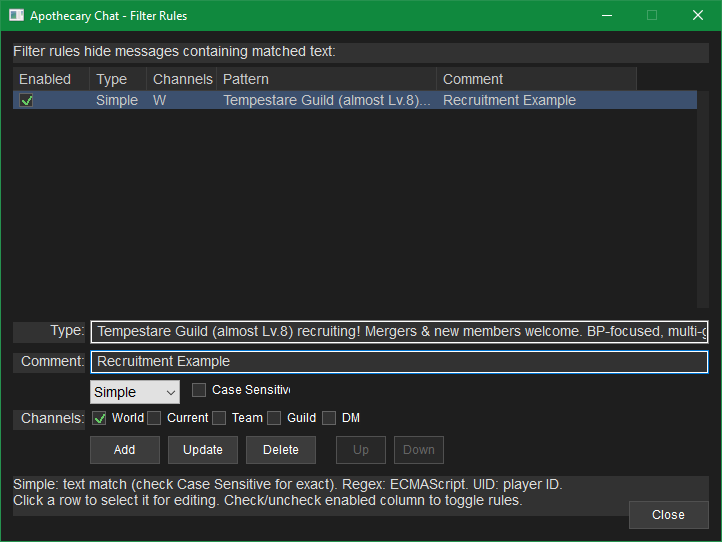
Filter Rules Dialog: Full-featured editor accessible from tray menu or right-click context menu.
- Add, edit, delete, and reorder filter rules within the editor.
- Enable/disable individual rules without deleting them.
- Add comments to rules for documentation purposes.
General:
- Messages now display the server's epoch timestamp instead of relying on local capture time.
- Improved performance when adding new messages (incremental layout changes in chat windows).
Bug Fixes:
- Fixed issue where the tray visibility menu could get stuck when focus changed without clicking.
- GDI font-renderer was not respecting monospacing request for timestamp rendering with Fira-Sans. Implemented manual monospacing to ensure consistent timestamp spacing.
- Visibility sub-menu no longer closes automatically, allowing multiple entries to be clicked before closing by clicking outside the dialog.
- Added per-window visibility toggle. Enable custom windows that are shown sometimes and hidden at others (e.g., a Global Chat window disabled during dungeons but enabled for boss hunting).
- Always pad each section of time up to two digits for consistent log spacing (e.g., 09:00 instead of 9:00).
- Apply each chat window's background color to the scrollbar for theme consistency.
- Improved marker compatibility with Season II netcode changes.
- Ported remaining flow reassembly from lwip for pcap flow monitoring. Nearing a complete TCP stack implementation.
- Detect TCP window gaps (missing data) if not captured for a stream, and re-synchronize rather than continuing with out-of-sync flow.
- Added additional edge cases in duplicate detection.
- Improved corrupt packet detection, discarding, and packet resequencing (TCP out-of-order buffering).
- In the case of corruption, there will be no "DUP" message anymore, as the DUP is instead treated as the intact original.
- For reliability additions to work fully, explicitly disable checksum offloading in your Network Card's Properties. Otherwise the checksum field may not be capturable. If checksum is not present (0), a best-effort approach without using checksum will be used instead.
- Added proper TCP fragmentation support.
- Improved duplicate rejection and filtering.
- Fixed a problem in the state machine that could prevent flow timeout and swapping from occurring. Previously, if the game disconnected (closing the game, swapping characters, etc.), Apothecary Chat could get stuck bound to the old game session.
- Color-coded tray icon: Red = Disconnected, Green = Connected.
- Consider any validly framed game packets as game data to prevent timeout and overzealous re-entry of detection state in the absence of chat messages (minimalist processing of non-chat payloads).
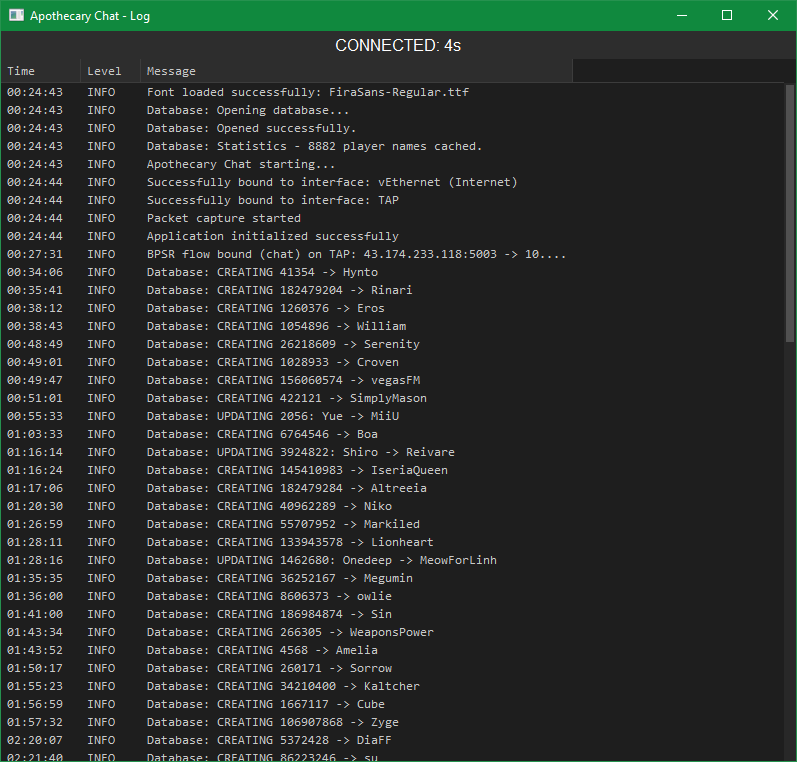
- Added connection state and time since last received data frame to top of log window for clearer connection status.
- Log window now set to always-on-top z-order.
- Now shows how many player names are saved in the database on startup.
- Fixed an issue where unexpected network frames could cause the app to freeze or become unresponsive (critical - could cause infinite loop).
- Fixed a race condition that could cause problems when renaming chat windows during data reception.
- Improved game flow detection.
- Added database health checks.
- Configuration values are now clamped to stay within safe ranges (such as if the settings file is hand-edited).
- Multi-interface packet aggregation: Ability to monitor more than one network interface at a time.
- Example use case: Playing on a laptop with WiFi and Wired connections, switching between interfaces on the fly by plugging in when at your desk. The game automatically reconnects, and Apothecary Chat can now follow the game traffic between interfaces and continue working.
- Similarly supports normal NIC and VPN interface selection, etc.
- Note: Selecting multiple interfaces may increase CPU utilization. Each interface accrues another packet monitoring thread.
- Added
-servicecommand-line argument. Launching with-servicesets an alternate service name and creates/uses a different database file (e.g.,-service SEA). - Different game instances may have overlapping UIDs for players. A player on SEA may have the same UID as a player on Global or CN. This poses a problem as the program builds a UID-to-Name database. Mixing game instances on the same database may lead to name errors.
- Batch file example included (SEA.bat) to launch Apothecary Chat using a separate "SEA" database.
- Added custom colors and a color picker to Global Settings and Window Settings for enhanced theming.
- Granularity on the Apply button for all windows. Individual settings can be checked or unchecked before confirming, and only selected settings will be applied.
- Switched from PlaySound to XAudio for sound playback (specifically for muxing). Allows multiple chimes to play concurrently.
- Rewrote TCP de-duplication logic, session scanning, timeout/disconnect/rescan handling. Aims to stop duplicate messages during poor connection and improve reliability.
- Fixed a multithreaded race condition (critical - program crash).
- Initial release.
- Chat overlay widget that permits creating an infinite number of customizable chat panes to be overlayed on top of the game window.
- Create individual or combined windows that show party messages, guild messages, private messages, etc.
- Set alert notifications (chimes) on chat message reception with unique notifications for different message types.
- See DMs (private messages) without opening the friends list, and receive alerts when receiving messages without having someone friended.
- Two-part UI: System tray icon (right-click menu) and chat windows. When not in click-through mode, a tabbar is displayed for chat windows with a settings tab for customization.
- SQL-based UID-to-Name mapping with local database persistence stored in
%USERPROFILE%\AppData\Local\apothecary_chat\. - Click-through mode with hotkey controls. Add windows, position them, configure them, then enable click-through mode.
- Left SHIFT recovery feature: Hold left SHIFT on application start to re-prompt for the network interface selection.
- Requires WinPcap or Npcap. For non-admin usage, pcap must be configured for standard user capture.
Download
Latest Version (2.2.13)
File: Apothecary Chat_2026-09-10_014645.7z
Size: 43.7 MiB (45,783,132 bytes)
SHA1: c73121b55df5aff2488b0df1318dd49093300240
Installation
Extract the archive anywhere and run apothecary_chat.exe. Data is stored in %USERPROFILE%\AppData\Local\apothecary_chat\.
Dependencies
A packet capture library is required. Install one of the following:
-
Npcap (Recommended)
Modern packet capture library for Windows. Actively maintained, recommended. -
WinPcap (Legacy)
Older packet capture library. No longer actively maintained but still functional. If you already have WinPcap installed (e.g., from a DPS meter), Apothecary Chat will work without additional setup.
Note: If you already use a DPS meter or similar tool, you likely have one of these installed already.
Contact
Issues or suggestions? DM me on Discord.
Credits
Acknowledgments
- Netcode reference: Star Resonance Damage Counter
- SQLite
- Npcap / WinPcap
- Blue Protocol: Star Resonance
Bandai Namco Studios Inc.
Shanghai Bokura Network Technology
A Plus Japan Inc.
Disclaimer
This tool reads network traffic (similar to DPS meters/parsers). It is read-only, limited to chat messages only, and will never interact with the game beyond that.